
Hyundai Tucson: Interior Trim / Rear Pillar Trim
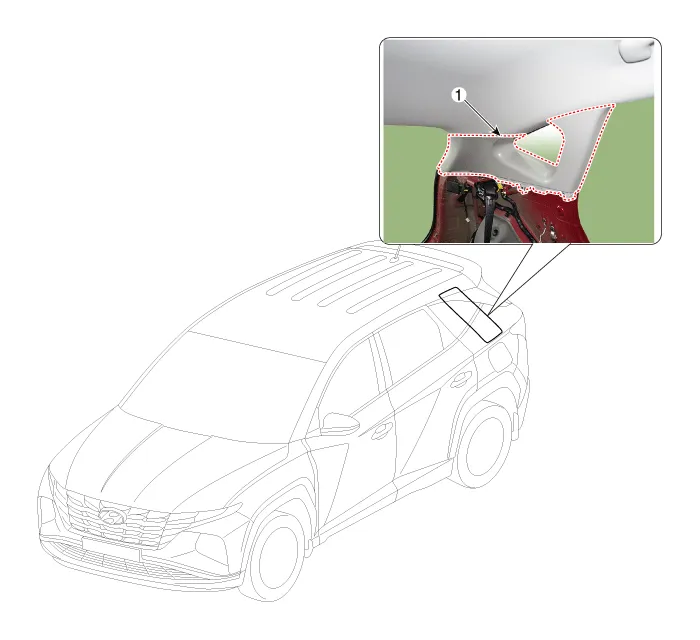
1. Rear pillar trim

• When removing with a flat-tip screwdriver or remover, wrap protective tape around the tools to prevent damage to components.
• Put on gloves to prevent hand injuries.

• Take care not to bend or scratch the trim and panels.
1.Remove the luggage side trim.(Refer to Trunk Trim - "Luggage Side Trim")
2.Using a screwdriver or remover, remove the rear pillar trim (A).
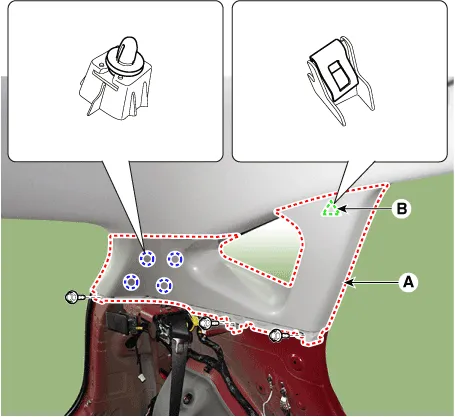
3.To install, reverse removal procedure.

• Replace any damaged clips (or pin-type retainers).
• Once the front pillar trim is removed, be sure to replace the clip (B) with new ones.
 Center Pillar Trim
- Component Location
1. Center pillar lower trim2.Center pillar upper trim
- Replacement
[Center pillar lower trim]
• When removing with a flat-tip screwdriver or ...
 Trunk Trim
Components and Components Location
- Components
1. Luggage tray2. Wheel house pad3. Luggage side trim4. Rear transverse trim5. Cargo screen6. Luggage board
Rear Transverse Trim
- Component ...
Other information:
Hyundai Tucson (NX4) 2022-2026 Owner's Manual: Electronic Parking Brake (EPB)
Applying the parking brake
To apply EPB (Electronic Parking Brake):
1. Depress and hold the brake pedal.
2. Pull up the EPB switch.
Make sure the Parking Brake warning
light comes on.
EPB (Electronic Parking Brake) may be
automatically applied when:
Requested by other systems.
The ...
Hyundai Tucson (NX4) 2022-2026 Service Manual: Roller Blind
- Removal
1.Remove the roof trim.(Refer to Roof Trim - "Roof Trim Assembly")
2.Open the roller blind using the panorama sunroof switch.
• Leave 10 - 20cm (0.3937 - 0.7874 in) of the roller blind unopened.
3.Put a fixed pin (A) into the hole located inside the groove o ...
