
Hyundai Tucson: Body (Interior and Exterior) / Trunk Trim
Components and Components Location
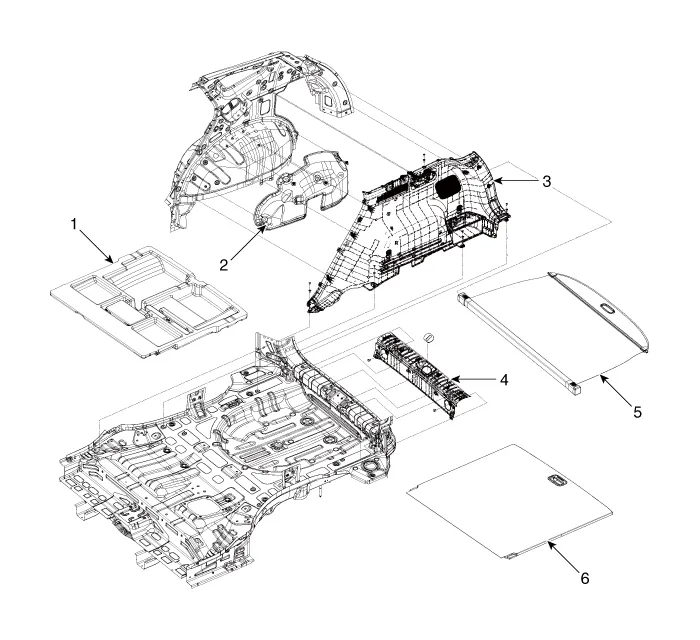
1. Luggage tray
2. Wheel house pad
3. Luggage side trim
4. Rear transverse trim
5. Cargo screen
6. Luggage board
Rear Transverse Trim

1. Rear transverse trim

• When removing with a flat-tip screwdriver or remover, wrap protective tape around the tools to prevent damage to components.
• Put on gloves to prevent hand injuries.

• Take care not to bend or scratch the trim and panels.
1.Remove the liftgate weatherstrip.(Refer to Liftgate - "Liftgate Weatherstrip")
2.Remove the luggage board (A).

3.Remove the luggate tray (A).
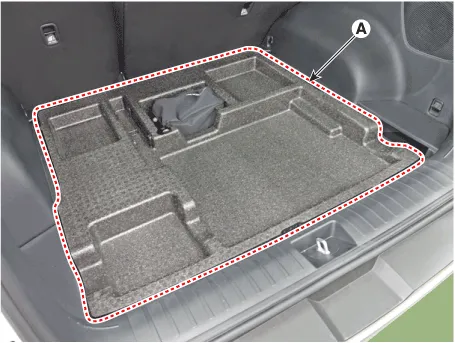
4.Remove the rear transverse trim (A).

5.To install, reverse removal procedure.

• Replace any damaged clips (or pin-type retainers).
Luggage Side Trim

1. Luggage Side Trim

• When removing with a flat-tip screwdriver or remover, wrap protective tape around the tools to prevent damage to components.
• Put on gloves to prevent hand injuries.

• Take care not to bend or scratch the trim and panels.
1.Disconnect the negative ( - ) battery terminal.
2.Remove the rear seat assembly.(Refer to Rear Seat - "Rear Seat Assembly")
3.Remove the rear transverse trim.(Refer to Trunk Trim - "Rear Transverse Trim")
4.Loosen the mounting screws and remove the luggage side trim (A).

5.Disconnect the connectors (A).

6.To install, reverse removal procedure.

• Replace any damaged clips (or pin-type retainers).
• Make sure the connectors are plugged in properly, and the antenna lead is connected properly.
 Rear Pillar Trim
- Component Location
1. Rear pillar trim
- Replacement
• When removing with a flat-tip screwdriver or remover, wrap protective tape around the tools to prevent dama ...
Other information:
Hyundai Tucson (NX4) 2022-2026 Service Manual: Repair procedures
- Removal
1.Disconnect the negative (-) battery terminal.
2.Remove the heater control unit.(Refer to Heating, Ventilation And Air Conditioning - "Heater Control Unit")
3.Remove the IBU (A) after loosening mounting bolt, nut and screw.
4.Disconnect IBU connectors and then remove the IBU (A) ...
Hyundai Tucson (NX4) 2022-2026 Service Manual: Components and Components Location
- Component Location
1. Buzzer2. Liftgate open switch (Crsah pad lower switch)3. Fob key4. Spindle Drive (2EA)5. Liftgate inner switch6. Power Latch7. PTG Control Module
Liftgate Inner Switch
...
