
Hyundai Tucson: Steering Wheel / Horn
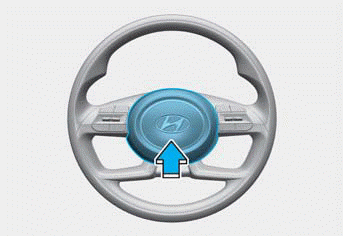
To sound the horn, press the area indicated by the horn symbol on your steering wheel (see illustration). The horn operates only when this area is pressed.
NOTICE
Do not strike the horn severely or hit it with your fist. Do not press on the horn with a sharp-pointed object.
NOTICE
Do not clean the steering wheel surface with the following products:
- Organic solvents such as thinner,
alcohol and gasoline
- Chemical products such as leather
cleaner, coating agent, and wax
 Steering Wheel Heater
When the ignition switch is in the ON
position or when the engine is running,
press the steering wheel heater button to
warm the steering wheel.
The indicator on the button illuminates.
To t ...
 Mirrors
...
Other information:
Hyundai Tucson (NX4) 2022-2026 Service Manual: Hood
Repair procedures
- Adjustment
1.After loosening the hinge (A) mounting bolt, adjust the hood (B)
by moving it up and down or from side to side and tighten the bolt.
2.Adjust the hood height by moving the hood overslam bumpers (C) up and down.
3.After loosening the hood latch (D) mounting ...
Hyundai Tucson (NX4) 2022-2026 Owner's Manual: Front Windshield Washers
In the OFF position, pull the lever gently
toward you to spray washer fluid on the
windshield and to run the wipers 1-3
cycles. The spray and wiper operation
continues until you release the lever. If
the washer does not work, you may need
to add washer fluid to the washer fluid
reser ...
