
Hyundai Tucson: Lighting System / Hazard Lamp Switch
1.Disconnect the negative (-) battery terminal.
2.Remove the front monitor.(Refer to AVN System - "Front Monitor")
3.Remove the hazard switch (A).
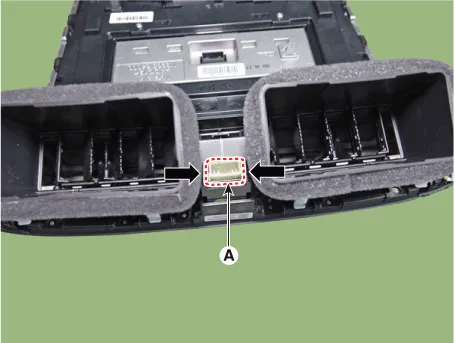
1.Install the hazard switch.
2.Install the front monitor.
3.Connect the negative (-) battery terminal.
 Overhead Console Lamp
- Removal
1.Disconnect the negative (-) battery terminal.
2.Remove the overhead console cover (A).
3.Remove the mounting screws.and then remove the overhead console (A).
4.Remove the overhe ...
 Rheostat
- Components
- Removal
1.Disconnct the negative (-) battery terminal.
2.Remove the crash pad lower panel.(Refer to Body - "Crash Pad Lower Panel")
3.Loosen the mounting screw and remove ...
Other information:
Hyundai Tucson (NX4) 2022-2026 Owner's Manual: 4 Wheel Drive (AWD) warning
light. 4 Wheel Drive (AWD) LOCK
indicator light
4 Wheel Drive (AWD) warning
light
This warning light illuminates:
Whenever a malfunction with the AWD
system is detected.
If this occurs, have the vehicle inspected
by an authorized HYUNDAI dealer.
For more information, refer to the "4
Wheel Drive (AWD)" section in Chapter 6.
4 Wheel ...
Hyundai Tucson (NX4) 2022-2026 Service Manual: Brake Pedal
- Components
1. Brake member assembly2. Stop lamp switch3. Brake pedal arm assembly4. Brake pedal pad
- Removal
1.Turn ignition switch OFF and disconnect the negative (-) battery cable.
2.Remove the crash pad lower panel.(Refer to Body - "Crash Pad Lower Panel")
3.Disconnect the sto ...
