
Hyundai Tucson: Lighting System / Overhead Console Lamp
1.Disconnect the negative (-) battery terminal.
2.Remove the overhead console cover (A).
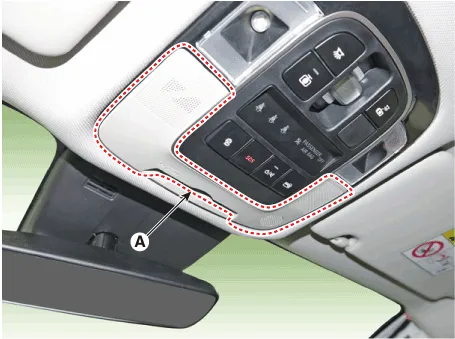
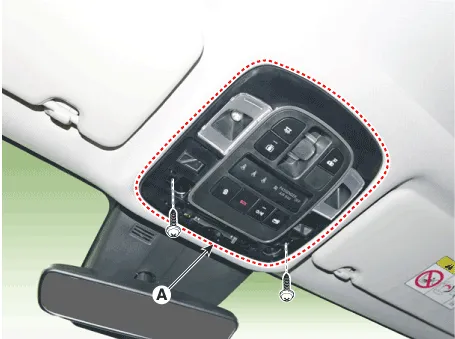
3.Remove the mounting screws.and then remove the overhead console (A).
4.Remove the overhead console after disconnect the connector (A).
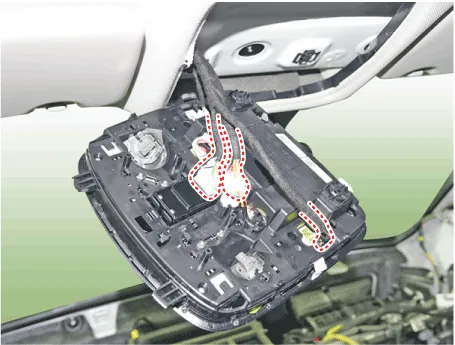
1.Install the overhead console lamp after connecting the connector.
2.Connect the negative (-) battery terminal.
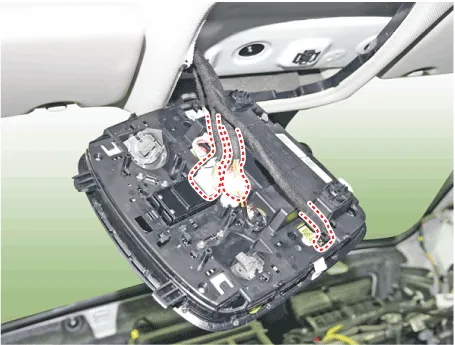
1.Remove the overhead console lamp assembly then check for continuity between terminals. If the continuity is not as specified, replace the map lamp switch.
| Pin NO | Description |
| 1 | Door |
| 13 | Ground |
| 16 | Door open signal |
| 22 | Rear room lamp signal |
 Room Lamp
- Removal
Rear Personal Lamp
1.Disconnect the negative (-) battery terminal.
2.Remove the rear personal lamp (A).
3.Disconnect the rear personal lamp connector (A).
Room Lamp (Without sunr ...
 Hazard Lamp Switch
- Removal
1.Disconnect the negative (-) battery terminal.
2.Remove the front monitor.(Refer to AVN System - "Front Monitor")
3.Remove the hazard switch (A).
- Installation
1.Install the h ...
Other information:
Hyundai Tucson (NX4) 2022-2026 Owner's Manual: How does the Airbag System
Operate?
The SRSCM (Supplemental Restraint
System Control Module) continually
monitors all SRS components while the
ignition switch is ON to determine if a
crash impact is severe enough to require
airbag deployment or pretensioner seat
belt deployment.
During a moderate to severe frontal
colli ...
Hyundai Tucson (NX4) 2022-2026 Owner's Manual: Anti-lock Brake System (ABS)
warning light. Electronic Brake Force
Distribution (EBD) system
warning light
Anti-lock Brake System (ABS)
warning light
This warning light illuminates:
When the ignition switch is in the
ON position. The ABS warning light
illuminates for about 3 seconds and
then goes off.
Whenever there is a malfunction with
the ABS.
The hydraulic braking system sti ...
