
Hyundai Tucson (NX4) 2022-2026 Service Manual / Engine Electrical System / Starting System / Troubleshooting
Hyundai Tucson: Starting System / Troubleshooting

• The battery must be in good condition and fully charged for this troubleshooting.
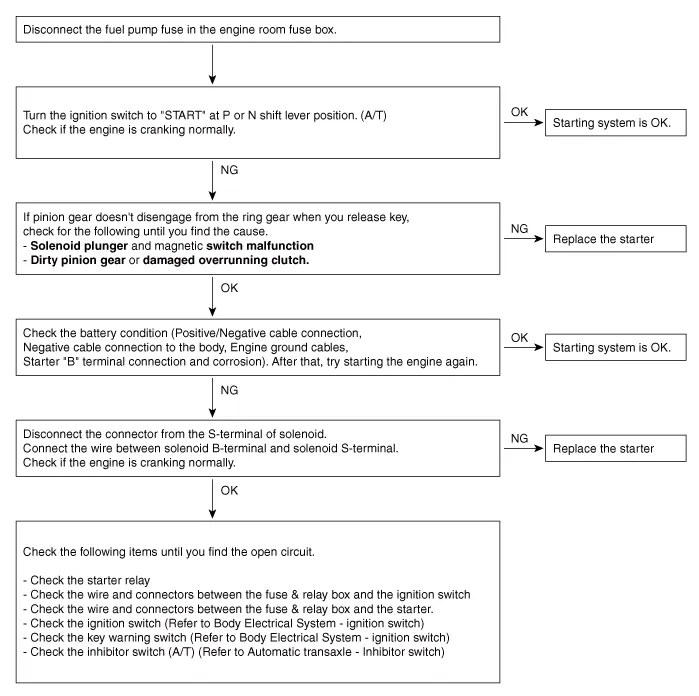
| Trouble symptom | Probable cause | Remedy |
| Engine will not crank | Battery charge low | Charge or replace battery |
| Battery cables loose, corroded or worn out | Repair or replace cables | |
| Transaxle range switch (Vehicle with automatic transaxle only) | Refer to AT group-automatic transaxle | |
| Fuse blown | Replace fuse | |
| Starter motor faulty | Replace | |
| Ignition switch faulty | Replace | |
| Engine cranks slowly | Battery charge low | Charge or replace battery |
| Battery cables loose, corroded or worn out | Repair or replace cables | |
| Starter motor faulty | Replace | |
| Starter keeps running | Starter motor faulty | Replace |
| Ignition switch | Replace | |
| Starter spins but engine will not crank | Short in wiring | Repair or replace wiring |
| Pinion gear teeth broken or starter motor | Replace | |
| Ring gear teeth broken | Replace fly wheel or torque converter |
 Description and Operation
- Description
The starting system includes the battery, starter, solenoid switch,
ignition switch, ignition lock switch, connection wires and the battery
cable.When the ignition key is turned t ...
 Starter
- Description
The starting system includes the battery, starter, solenoid switch,
ignition switch, ignition lock switch, connection wires and the battery
cable.When the ignition key is turned t ...
Other information:
Hyundai Tucson (NX4) 2022-2026 Service Manual: Schematic Diagrams
- Circuit Diagram
With Smart Key
Without Smart Key
...
Hyundai Tucson (NX4) 2022-2026 Service Manual: Cowl Side Trim
- Component Location
1. Cwol side trim
- Replacement
• When removing with a flat-tip screwdriver or remover, wrap protective tape around the tools to prevent damage to components.
• Put on gloves to prevent hand injuries.
• Take care ...
© 2023-2026 Copyright www.htucson4.com
