
Hyundai Tucson: IMS (Integrated Memory) / IMS Control Switch
1.Disconnect the negative (-) battery terminal.
2.Remove the front door trim.(Refer to Body - "Front Door Trim")
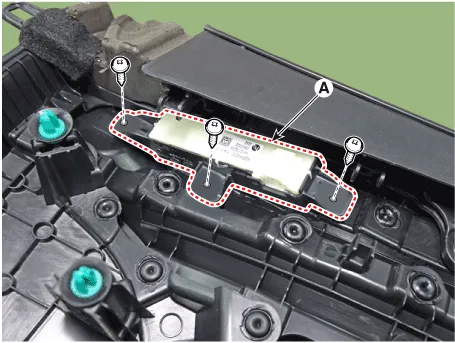
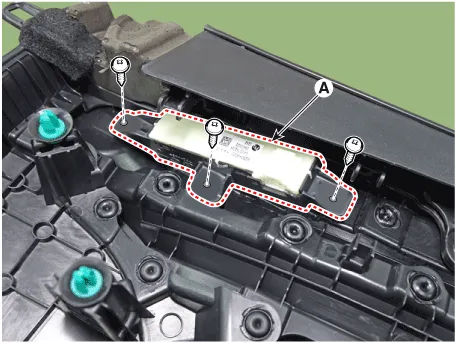
3. Remove the IMS switch (A) after loosening mounting screws.
1.Install the IMS switch.
2.Reassemble the front door trim.
3.Connect the negative (-) battery terminal.
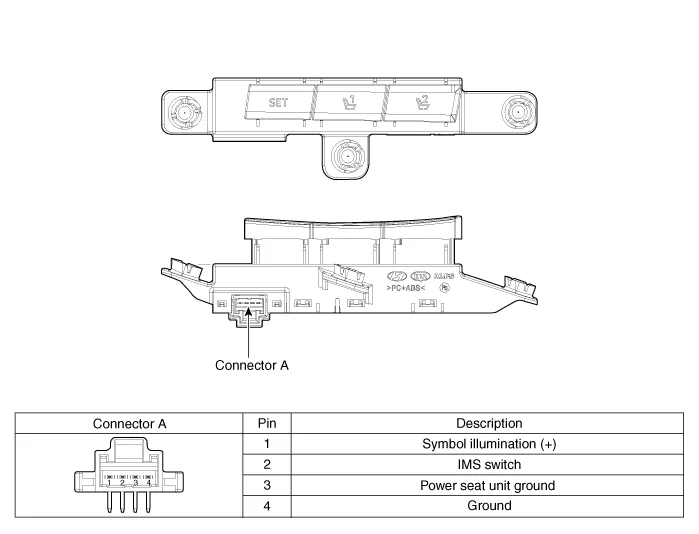
1.Disconnect the IMS control switch connector (A).
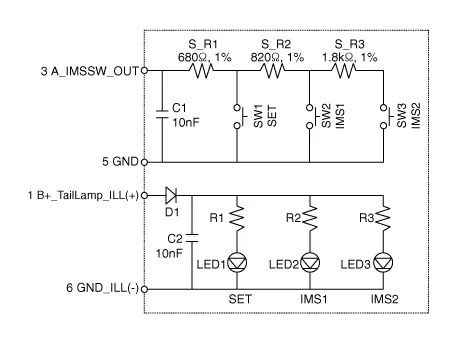
2.With the power IMS control switch in each position, make sure that continuity exists between the terminals below. If continuity is not as specified, replace the IMS control switch.
 IMS (Integrated Memory System) module
- Components
IMS input/output pin information
PinConnector AConnector BConnector C
1-B+ (Power)Seat slide motor switch (Forward)
2Seat recline motor (Forward)Ground (Power)Seat recline switch ...
 Fuel Filler Door
Components and Components Location
- Component Location
1. Fuel filler door release actuator
Fuel Filler Door Release Actuator
- Inspection
1.Disconnect the negative (-) battery terminal. ...
Other information:
Hyundai Tucson (NX4) 2022-2026 Owner's Manual: Emergency Precautions
Tires
Do not use tires or wheels with different
size and type from the one installed on
your vehicle. It may affect the safety
and performance of your vehicle, which
could cause steering failure or rollover
causing serious injury.
When replacing the tires, be sure to
equip all four tir ...
Hyundai Tucson (NX4) 2022-2026 Service Manual: Power Liftgate Latch
- Removal
1.Disconnect the negative (-) battery terminal.
2.Remove the liftlgate trim.(Refer to Body - "Liftgate Trim")
3.Disconnect the latch connector (A).
4. Remove the power liftgate latch (A) after loosening mounting bolts.
- Installation
1.nstall the power liftgate latch.
2.I ...
