
Hyundai Tucson: Body Electrical System / Ignition Switch Assembly. Ignition Switch
Ignition Switch
1.Disconnect the negative (-) battery terminal.
2.Remove the steering column upper and lower shrouds.(Refer to Body - "Steering Column Shroud Panel")
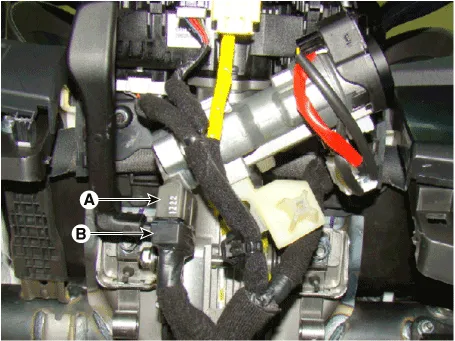
3.Remove the ignition switch (A) after disconnecting the 6P connector (B).
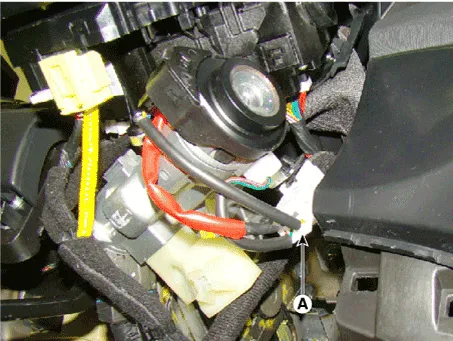
4.Remove the key warning and immobilizer connector (A).
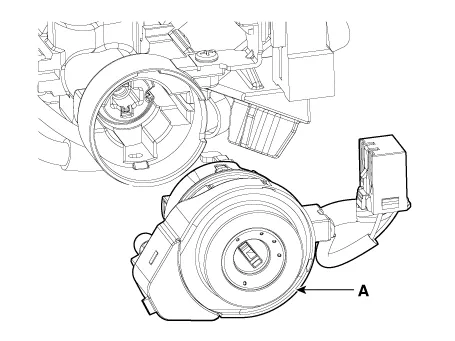
5.If it is necessary to remove the key lock cylinder (A), remove the key lock cylinder with key ACC.
1.Install the key lock cylinder.
2.Install the key warning and immobilizer connector.
3.Install the ignition switch.
4.Install the steering column shrouds and crash pad lower panel.
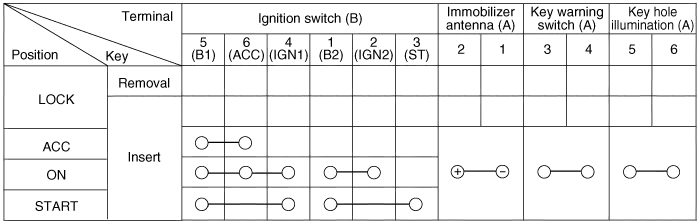
1.Disconnect the ignition switch connector (B) and key warning switch connector (A) from under the steering column.
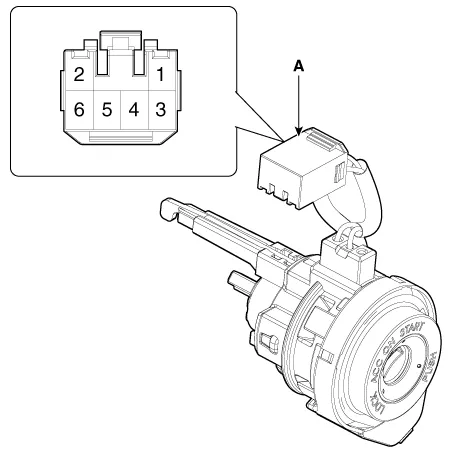
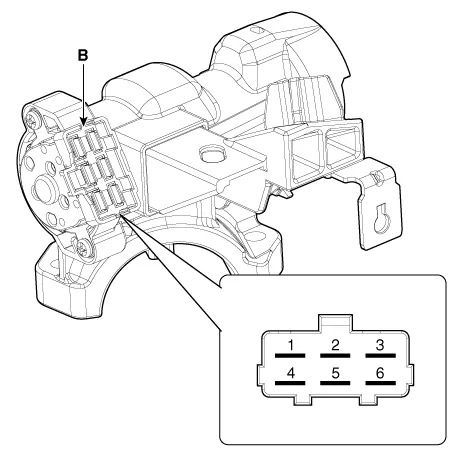
2.Check for continuity between the terminals.
3.If continuity is not specified, replace the switch.
 Wireless Charging Lamp
- Components
- Removal
Handling wireless charging system parts by wet hands may cause electric shock.
1.Disconnect the negative (-) battery terminal.
2.Remove the flo ...
Other information:
Hyundai Tucson (NX4) 2022-2026 Service Manual: Troubleshooting
- Troubleshooting
SymptomPossible causeRemedy
Hard steeringImproper front wheel alignmentCorrect
Excessive turning resistance of lower arm ball jointReplace
Low tire pressureAdjust
No power assistRepair and replace
Poor return of steering wheel to centerImproper front wheel alignmentCorrect
...
Hyundai Tucson (NX4) 2022-2026 Service Manual: Lumber Support System
- Removal
1.Disconnect the negative (-) battery terminal.
2.Remove the front seat back cover.(Refer to Body - "Front Seat Back Cover")
3.Disconnect motor connecotor (A).
4.Remove the front side airbag (A).
5.Remove the lumber support cable bracket after loosening mounting screws.
6.R ...
