
Hyundai Tucson: Body (Interior and Exterior) / Floor Carpet. Repair procedures
Repair procedures

• When removing with a flat-tip screwdriver or remover, wrap protective tape around the tools to prevent damage to components.
• Put on gloves to prevent hand injuries.

• Take care not to bend or scratch the trim and panels.
1.Remove the floor console assembly.(Refer to Floor Console - "Floor Console Assembly")
2.Remove the front seat assembly.(Refer to Front Seat - "Front Seat Assembly")
3.Remove the rear seat cushion assembly.(Refer to Rear Seat - "Rear Seat Assembly")
4.Remove the cowl side trim.(Refer to Interior Trim - "Cowl Side Trim")
5.Remove the center pillar lower trim.(Refer to Interior Trim - "Center Pillar Trim")
6.Remove the luggage side trim.(Refer to Trunk Trim - "Luggage Side Trim")
7.Remove the accelerator pedal module.(Refer to Fuel system - "accelerator pedal")
8.Remove the front floor carpet (A).
9.Remove the rear floor carpet (B).
10.To install, reverse removal procedure.

• Replace any damaged clips (or pin-type retainers).
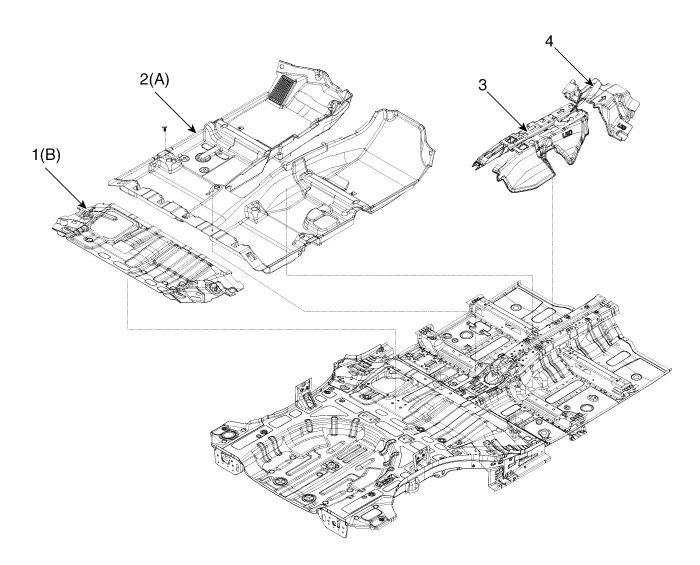
1. Rear floor carpet
2. Front floor carpet
3. Rear tunnel pad
4. Front tunnel pad
Other information:
Hyundai Tucson (NX4) 2022-2026 Service Manual: Panorama Sunroof Deflector
- Replacement
1.Open movable glass completely pressing panorama sunroof switch.
2.Loosen the panorama sunroof deflector mounting screws and remove the bracket (A).
3.Separate the panorama sunroof deflector link (A) and remove the panorama sunroof deflector (B).
4.To install, reverse the r ...
Hyundai Tucson (NX4) 2022-2026 Service Manual: Front Seat Cushion Cover
- Component Location
1. Front seat cushion cover
- Replacement
• When removing with a flat-tip screwdriver or remover, wrap protective tape around the tools to prevent damage to components.
• Put on gloves to prevent hand injuries.
• ...
