
Hyundai Tucson: AVN System / Antenna
1.Disconnect the negative (-) battery terminal.
2.Remove the roof trim.(Refer to Body - "Roof Trim Assembly")
3.Disconnect the antenna connector (A) and then remove the roof antenna after loosening mounting nut (B).
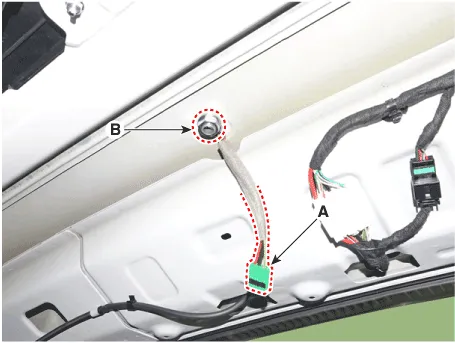
1.Install the integrated antenna and then connecting the antenna connector.
2.Install the rear roof trim.
3.Connect the negative (-) battery terminal.

• Make sure that the cables and connectors are plugged in properly.
• Check the AVN system for normal operation.
 Speakers
- Inspection
1.Check the plus (+) and negative (-) speaker terminals using an ohmmeter.
2.Check the supply power to the speaker and the resistance, then inspect the sound quality.
- Removal
...
 USB Jack
- Description
The USB jack on the console tray assembly is for customers who like to
listen to external portable music players like the MP3, earphone, USB
memory stick through the vehicle's sou ...
Other information:
Hyundai Tucson (NX4) 2022-2026 Service Manual: Relay Box (Passenger Compartment)
- Dscription and Operation
ICU (Integrated Central Control Unit)
ICU (Integrated Central Control Unit) is an integrated model of smart
junction block and central gateway. It performs the function of
conventional "Smart junction block" and the function of communication
medium of "Central Ga ...
Hyundai Tucson (NX4) 2022-2026 Service Manual: Fuel Sender
- Removal
1.Remove the fuel pump.(Refer to Fuel Delivery System - "Fuel Pump")
2.Disconnect the fuel sender connector (A).
3.Release the fixing hook (A) and then remove fuel sender (B) in the arrow direction.
- Installation
1.Install in the reverse order of removal. ...
