
Hyundai Tucson: Audio / Antenna
1.Disconnect the negative (-) battery terminal.
2.Remove the rear roof trim.(Refer to Body - "Roof Trim Assembly")
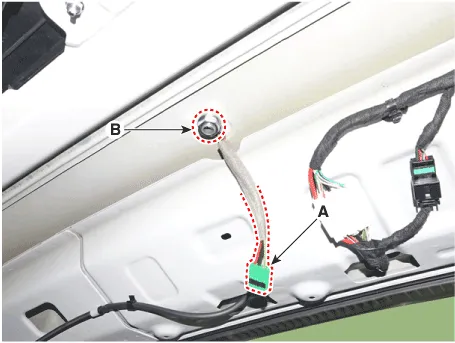
3.Disconnect the antenna connectors (A) and then remove the mounting nut (B).
1.Install the integrated antenna.
2.Connect the antenna connector and then install the mounting nut.
3.Install the roof trim.
4.Connect the negative (-) battery terminal.

• Make sure that the cables and connectors are plugged in properly.
• Check the audio system for normal operation.
 Speakers
- Inspection
1.Check the plus (+) and negative (-) speaker terminals using an ohmmeter.
2.Check the supply power to the speaker and the resistance, then inspect the sound quality.
- Removal
...
 Audio Remote Control
- Components
1. Left Remote Control Switch (Audio)2. Right Remote Control Switch (Cruise)
- Schematic Diagrams
Audio + B/Tooth+Voice+TRIP+SCC+MSLA+LFA
Audio + B/Tooth+Voice+TRIP+SCC+M ...
Other information:
Hyundai Tucson (NX4) 2022-2026 Service Manual: Rear Axle Assembly. Rear Hub - Carrier
Rear Hub - Carrier
- Components
1. Rear brake disc2. Rear hub assembly3. Dust cover4. Rear carrier assembly
- Removal
[2WD]
• When lifting a vehicle using a lift, be careful not to damage
the lower parts of the vehicle (floor under cover, fuel filter, fuel
ta ...
Hyundai Tucson (NX4) 2022-2026 Service Manual: ATF Warmer
- Description
• The ATF warmer is mounted on the valve body cover to reduce oil
viscosity friction by increasing oil temperature under cold condition,
which in turn improves fuel efficiency. It is serial mounted on the
entry of the Electronic Throttle Controller (ETC), as shown in the
...
