
Hyundai Tucson: Picture Index
Exterior Overview
Exterior Overview (Front View)
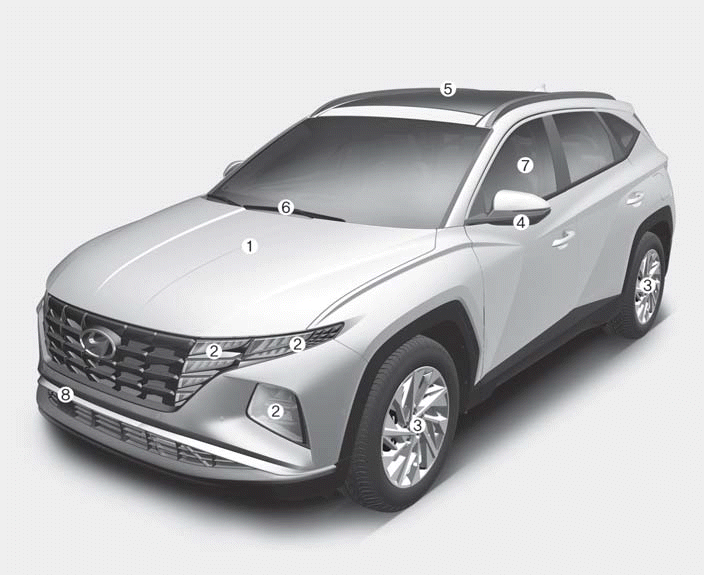
1. Hood
2. Headlight
3. Tires and wheels
4. Side view mirror
5. Panoramic sunroof
6. Front windshield wiper blades
7. Windows
8. Front radar
Exterior Overview (Rear View)
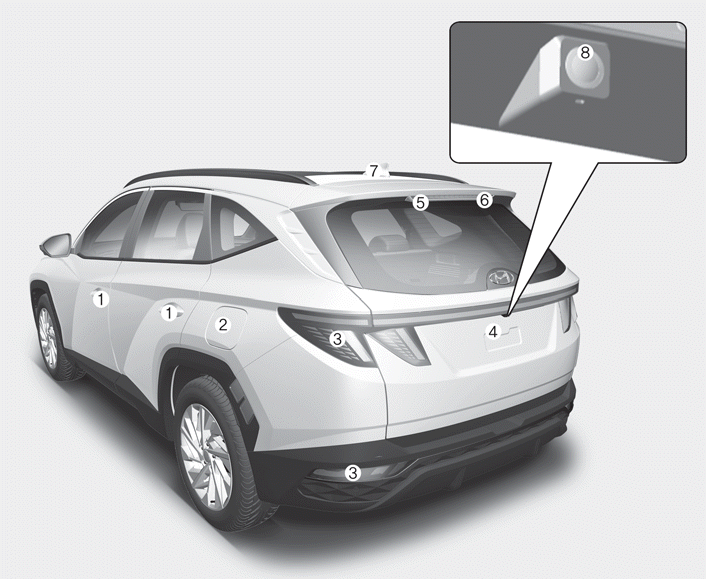
1. Door handle
2. Fuel filler door
3. Rear combination light
4. Liftgate
5. High mounted stop light
6. Rear window wiper blades
7. Antenna
8. Wide-rear view camera
Interior Overview
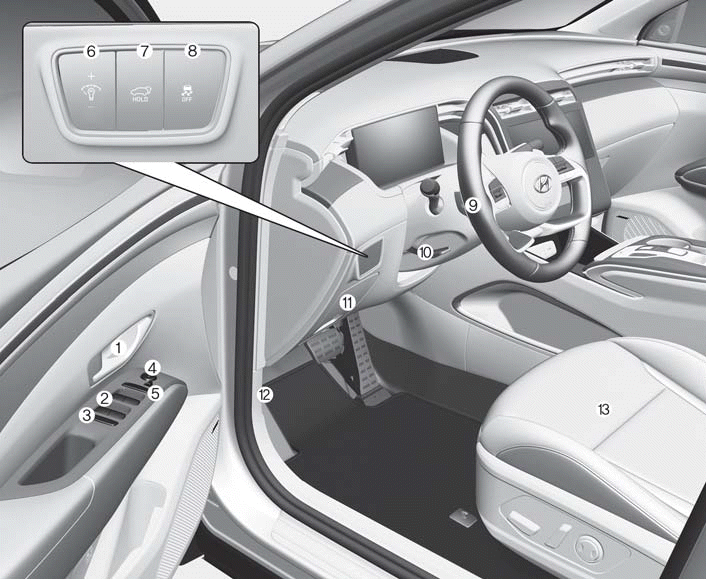
1. Inside door handle
2. Power window switches
3. Power window lock button
4. Side view mirror control switch
5. Driver central door lock/unlock
switch
6. Instrument panel illumination control
switch
7. Power liftgate button
8. ESC OFF button
9. Steering wheel
10. Steering wheel tilt/telescopic lever
11. Fuse box
12. Hood release lever
13. Seat
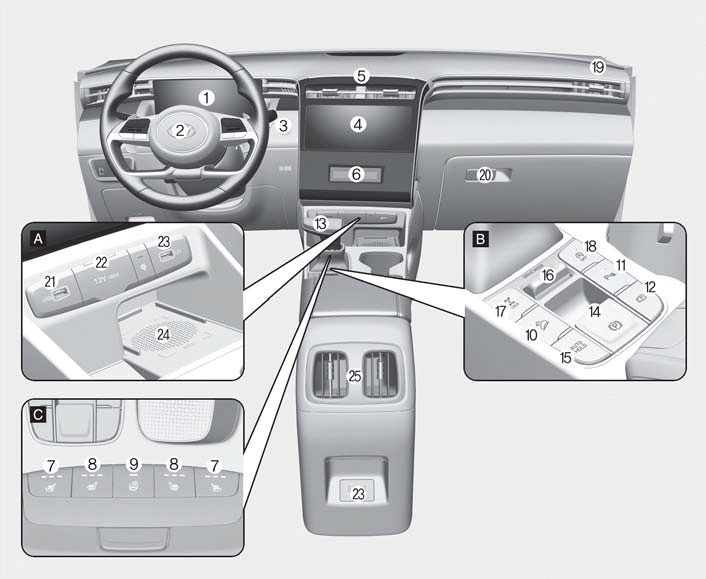
Center Console Overview
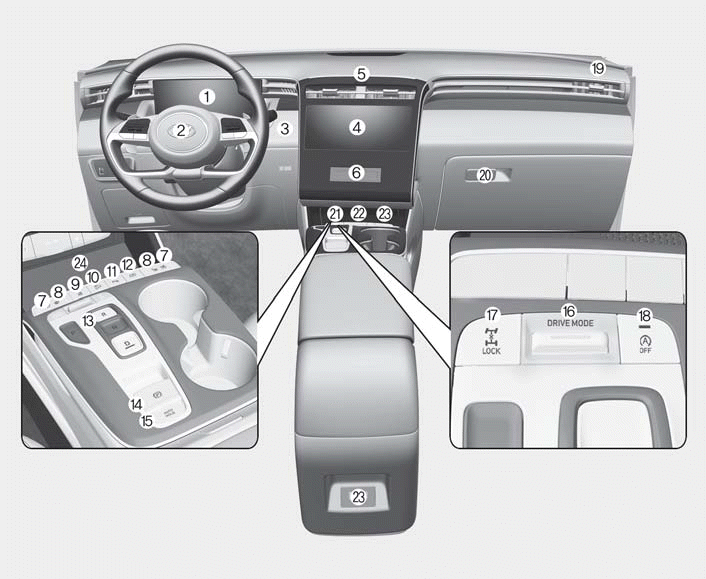
Type A
1. Instrument cluster
2. Driver’s front airbag
3. Push Button Start ignition switch
4. Infotainment system
5. Hazard warning flasher button
6. Climate control system
7. Air ventilation seat
8. Seat warmer
9. Steering wheel heater
10. DBC button
11. Parking Safety button
12. Parking/View button
13. Shift button
14. EPB (Electronic Parking Brake)
switch
15. Auto Hold switch
16. Drive mode button
17. AWD lock button
18. ISG (Idle Stop and Go) OFF button
19. Passenger’s front airbag
20. Glove box
21. USB port
22. Power outlet
23. USB charger
24. Wireless charging system pad
Type B
1. Instrument cluster
2. Driver’s front airbag
3. Key ignition switch
Push Button Start ignition switch
4. Infotainment system
5. Hazard warning flasher button
6. Climate control system
7. Air ventilation seat
8. Seat warmer
9. Steering wheel heater
10. DBC button
11. Parking Safety button
12. Parking/View button
13. Shift lever
14. EPB (Electronic Parking Brake)
switch
15. Auto Hold switch
16. Drive mode button
17. AWD lock button
18. ISG (Idle Stop and Go) OFF button
19. Passenger’s front airbag
20. Glove box
21. USB port
22. Power outlet
23. USB charger
24. Wireless charging system pad
Steering Wheel Control Overview
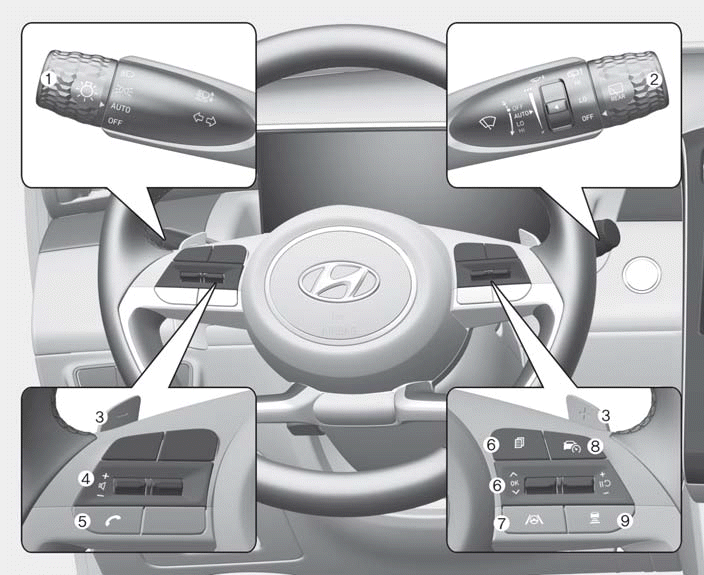
1. Turn signal lever/Headlight switch
2. Wiper and washer control lever
3. Paddle shifter
4. Audio remote control buttons
5. Bluetooth® hands-free phone
button
6. Cluster display control
7. Lane Driving Assist button
8. Driving Assist button
9. Vehicle Distance button
Engine Compartment Overview
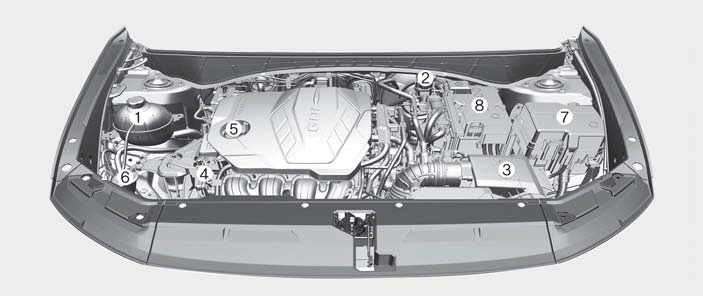
Smartstream G2.5 GDI
1. Engine coolant reservoir
2. Brake fluid reservoir
3. Air cleaner
4. Engine oil dipstick
5. Engine oil filler cap
6. Windshield washer fluid reservoir
7. Fuse box
8. Battery
 Hyundai Tucson (NX4) 2022-2026 Owner's Manual
h1 {color:#FF0000;font-size:26px; font-family: Arial;}
h2 {color:#0000FF;font-size:24px; font-family: Arial;}
h3 {color:#008000;font-size:22px; font-family: Arial;}
h4 {color:#FF00FF;fo ...
Other information:
Hyundai Tucson (NX4) 2022-2026 Owner's Manual: Low tire pressure warning
light
This warning light illuminates:
When the ignition switch is in the
ON position. The Low Tire Pressure
warning light illuminates for about 3
seconds and then goes off.
When one or more tires are
significantly underinflated. (The
location of the underinflated tire
appears on ...
Hyundai Tucson (NX4) 2022-2026 Service Manual: Liftgate Weatherstrip
- Replacement
• Do not apply sealant to the body.
1.Remove the liftgate weatherstrip (A).
2.To install, reverse removal procedure.
• When installing the liftgate weatherstrip, check the center-marking line (B).
...
